


RV Parks & Campgrounds
4.43.65K Reviews
App Specs
- Version
- 4.4.9
- Updated On
- License
- Free
- Downloads
- 500,000+
- Developer
- ParkAdvisor
- Categories
- Travel & Local
- Platform
- Android
Screenshots
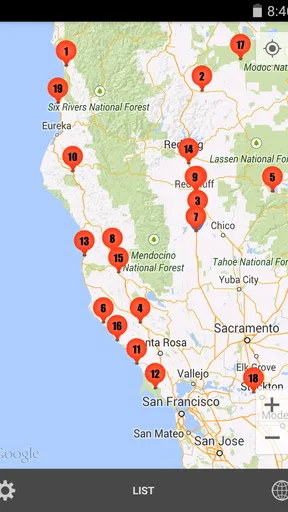
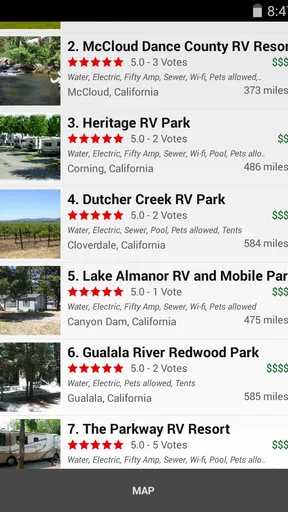
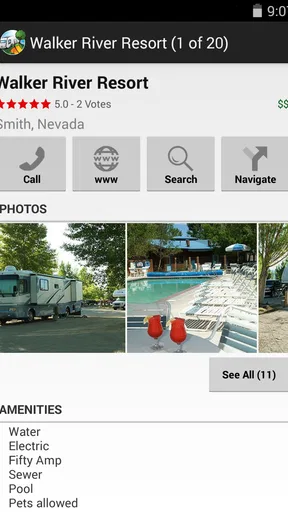
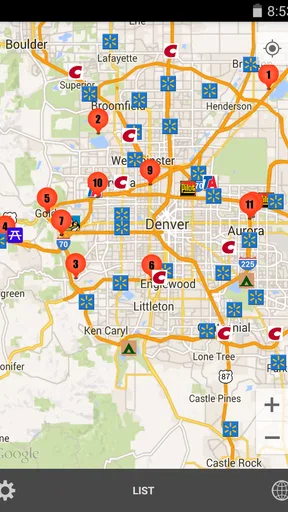
 Analysis by AppCompare
Planning an RV trip is rarely difficult because of the driving itself. The harder part is finding a suitable place to stop, checking whether it fits your vehicle and plans, and avoiding a last-minute search when you are already tired. RV Parks & Campgrounds is built around that practical problem. It is a Travel & Local app from ParkAdvisor that brings RV parks, campgrounds, rest areas, fuel stops, and stores into one searchable place.
I found its value less in flashy presentation and more in the way it can become part of a repeatable travel routine. Instead of opening separate searches for a campsite, a rest break, and fuel, I can begin with one map and narrow the trip from there. It is free to install, rated for Everyone, and has reached more than 500 thousand installs, so it is clearly aimed at ordinary travelers rather than a specialist audience.
The app currently appears as version 4.4.9, while its long history—the app was released on February 7, 2015—helps explain why its broad directory is the main attraction. Its average rating is 4.4 from around 9 thousand ratings, with roughly 3 thousand written reviews. Those figures suggest a mature, useful tool, but they do not mean every listing will suit every traveler. My experience is that the app works best as a planning and comparison aid, not as permission to arrive anywhere without checking the details.
Building a reliable trip-search routine
I use this section to explain how I turn an initial map search into a routine I can repeat without rushing. The useful shift is to decide what the next stretch of travel needs before comparing places, so each search has a clear purpose. From there, a few deliberate habits can make the app easier to use on later trips.
Start with the whole route, not just tonight’s stop
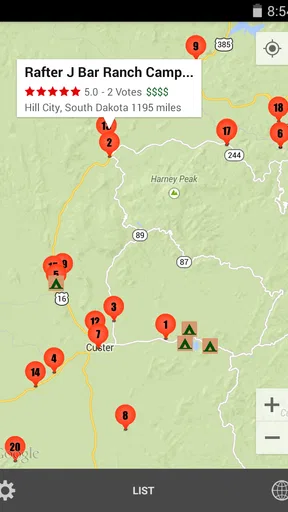
My baseline workflow begins before I need a place to sleep. I enter the general route and look at the surrounding options rather than choosing the first visible campground. This matters because an apparently convenient park may create a longer drive the next morning, while a rest area or fuel stop farther along may make the following day easier.
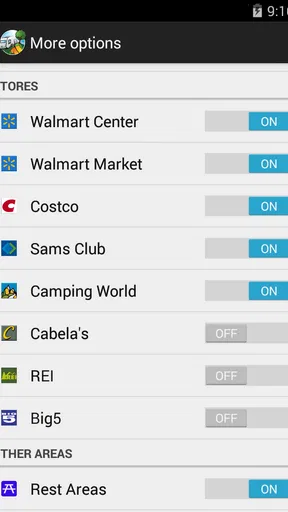
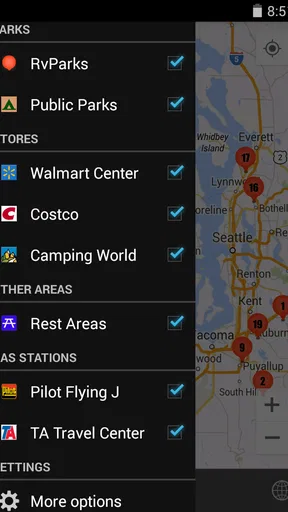
The broad selection is especially useful for travelers who do not follow a fixed campground chain. A family taking a flexible road trip, a couple moving between regions, or a solo driver who prefers to decide each evening can all use the map to compare different kinds of stops. The app’s coverage includes more than 40 thousand locations across RV parks, campgrounds, rest areas, gas stations, and stores, so it is not limited to overnight accommodation.
I recommend separating three decisions that are easy to mix together: where to sleep, where to pause safely, and where to resupply. A campground may be the right overnight choice but too far from fuel. A store may solve a supply problem without being a sensible place to stop for the night. Treating each category as part of the same route plan makes the map much more useful.
Worth Reading Before You Choose

EA SPORTS FC Mobile 26 Is a Bigger Football Game, but It Takes Time

Flipboard Shows What News Apps Must Do Beyond the Feed

Switching to Android Auto Means Rethinking Your Driving Routine

Google Calendar Makes a Crowded Week Easier to Manage

Ludo King Makes the Most of the Minutes Between Plans

Baby Panda World Brings Quick Play to Modern Phones, but Its Game Library Feels Busy
Use the app as a shortlist, then verify the final choice
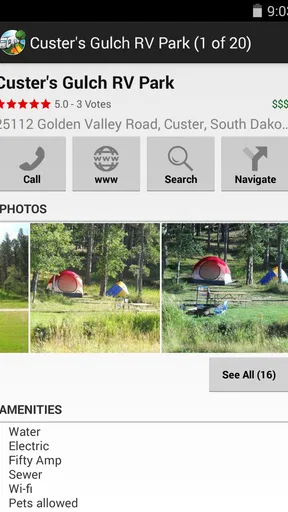
One of the most important habits is to create a shortlist instead of committing immediately. I compare several nearby entries, read the available descriptions and reviews, and look for information that affects my particular setup. A compact camper, a large motorhome, and a trailer with a tow vehicle do not have the same requirements, even when they are all searching for an RV park.
That is where user feedback becomes more valuable than a simple location pin. Reviews can reveal whether a site is convenient for a quick overnight, whether access feels awkward, or whether the setting is better suited to a longer stay. I do not treat one enthusiastic or negative comment as a final verdict. I look for repeated patterns and then confirm important details directly with the location.
This final check is essential for questions such as current availability, arrival arrangements, site dimensions, hookups, restrictions, and opening conditions. A directory can help me discover an option, but it cannot replace a call or an official confirmation when the trip depends on a specific facility.
A realistic evening scenario
Imagine finishing a long driving day with two hours of daylight left and needing a simple overnight stop. I would first search the route ahead, then compare campgrounds with rest areas and nearby fuel. If the vehicle needs fuel before reaching the overnight stop, I would place that task first rather than assuming a campground is close to a station. If the family needs groceries, I would also check stores without turning the search into a hunt for the perfect destination.
Once I have two or three plausible choices, I would read recent comments, examine the route, and contact the preferred site if the arrival time or vehicle size could be an issue. The app reduces the time spent discovering options, while my own checks handle the details that matter most. That division of labor is the safest way to use it.
Settings, shortcuts, and habits that make it more useful
Here I focus on small choices that keep a search manageable, from narrowing the map to checking a candidate against the day’s actual route. I also consider how I prepare when I may have limited time or connectivity, without assuming that the app can replace other travel tools. These habits matter most when a quick decision still needs to be a careful one.
Check the basics before the first trip
I would open the app at home before relying on it on the road. That gives me time to understand how locations are displayed, how categories are selected, and how the map behaves when I move between a broad route and a local search. It is much easier to learn the interface while parked than with a vehicle waiting and passengers asking for a decision.
It is also worth checking the device’s location and notification choices in the normal system settings. A map-based travel tool is more convenient when it can identify the area I am exploring, but I still prefer to control permissions deliberately. I do not grant access simply because an app requests it; I enable what supports the way I travel and leave unnecessary options alone.
Because road conditions and coverage can vary, I avoid treating any travel app as a substitute for preparation. Before leaving, I note the names and locations of likely stops and keep essential route information available in another form. This is not a criticism unique to ParkAdvisor. It is a sensible precaution whenever a trip depends on mobile connectivity, battery life, or changing map conditions.
Make categories work for the actual day
The strongest setting choice is the one that matches the immediate task. When I am looking for an overnight location, I focus on RV parks and campgrounds. When I am planning a break, rest areas become more relevant. For a resupply run, gas stations and stores deserve attention. Keeping the search focused prevents the map from becoming visually noisy.
There is a useful trade-off here. A narrow category makes decisions faster, but a broad view can reveal a better combination of stops. I use the narrow view first to solve the immediate problem, then briefly widen it to see whether fuel, food, and rest can be arranged along the same stretch of road. That two-pass method is quicker than studying every symbol at once.
I also keep my search radius practical. A location that looks close on a map may be inconvenient for a large vehicle if the approach includes tight streets, steep roads, or a difficult turn. The app helps me find candidates, but the route itself deserves attention. I compare the map with the vehicle’s needs and with the time of day, especially when arriving after dark.
Use reviews as evidence, not decoration
When I read comments, I search mentally for details that affect my own trip. Is the reviewer describing a short stop or a multi-night stay? Were they traveling with a small van or a larger rig? Did they mention access, noise, cleanliness, or the usefulness of nearby stores? The same place can be excellent for one purpose and frustrating for another.
A practical trick is to write down the question that each review answers. One comment may help with arrival, another with the surrounding area, and another with the suitability of the site for a particular type of vehicle. This prevents me from allowing a general star impression to replace the specific information I actually need.
The app’s rating of 4.4 is encouraging, but I would not use the average alone to choose a campsite. A high score does not automatically mean the location is close to my route, open when I arrive, or equipped for my vehicle. The rating is a starting signal; the individual context is what makes it useful.
Repeatable patterns for faster planning
Experienced users can save time by repeating the same order of checks on every trip. I begin with route, then category, then practical fit, then reviews, then confirmation. Following that sequence avoids jumping between attractive locations without deciding what the trip actually requires.
Another efficient pattern is to plan in layers. First I identify a primary overnight option. Next I find a backup in the same general area. Finally I mark a fuel or store stop that would still be useful if the primary plan changes. This is more resilient than searching for a single perfect campground, especially on busy travel days.
I also prefer to search before fatigue becomes a problem. If I wait until the last few miles, I am more likely to accept an unsuitable location or overlook an important detail. A short planning session earlier in the day lets me compare options calmly and leaves room to adjust the route.
For repeat travelers, the app can support a personal travel notebook alongside the map. I record which locations were useful, what questions needed a phone call, and which types of listing did not match my vehicle. That habit turns each trip into better preparation for the next one, even though the app itself remains a discovery tool rather than a complete travel diary.
Where the app is not the best answer
RV Parks & Campgrounds is not my first choice when I need a highly specialized booking experience, a guaranteed reservation workflow, or detailed information tailored to one particular campground network. In those cases, an official campground system or a direct conversation with the property may be better.
I would also skip relying on it alone for a trip where every stop must meet strict requirements. Travelers with unusually large vehicles, accessibility needs, pets, unusual power demands, or a narrow arrival window should use the app to discover candidates and then confirm everything important. A broad directory is convenient, but broad coverage naturally means that the traveler still has to filter for personal circumstances.
Compared with a general map app, this one has a clearer travel-specific purpose. A standard map is often better for traffic, business hours, street-level context, and turn-by-turn navigation. ParkAdvisor’s advantage is bringing relevant stop categories together so I can think in terms of an RV journey rather than isolated businesses. I use the two approaches together: this app for discovery and comparison, the general map or navigation tool for the final route details.
Compared with searching the web one location at a time, the app is less fragmented. I can scan several possibilities in the same area and move between campground, rest, fuel, and store needs without rebuilding the search from scratch. The trade-off is that a web search may surface official pages or very recent announcements more directly, which is why I still verify time-sensitive information before departure.
Cost, access, and the small print of everyday use
The app is free, which makes it easy to try without committing money before knowing whether its directory fits my travel style. It also carries an Everyone age rating, so it is suitable as a general household travel tool rather than something restricted to a particular age group.
There are in-app purchases listed at $7.99 per item. I would not assume that every traveler needs them immediately. My approach would be to use the free experience first, learn whether the search and map support my normal routes, and only then decide whether an optional purchase adds enough value to justify it. The important point is to evaluate the app by actual use rather than by the existence of an upgrade.
The minimum operating-system requirement is Android 4.1, which is relatively accommodating for older Android devices. That can matter when an RV is equipped with a spare phone or an older tablet. Even so, I would test the app on the exact device intended for travel, because an older phone may have its own limitations with battery, storage, location accuracy, or general performance.
My final view after making it part of a travel routine
The real strength of RV Parks & Campgrounds is not that it removes every uncertainty; it puts the right travel questions in one place. I can search for an overnight site, identify a rest area, find fuel, and locate a store without treating each need as a separate research project. That is a meaningful advantage when planning a flexible route or making a decision during a long drive.
Its best audience is the traveler who wants options and is willing to compare them. It suits RV owners, camper users, road-tripping families, and anyone who regularly needs practical stops rather than only famous destinations. It is particularly helpful when I plan early, keep a backup, read reviews with context, and confirm details that could disrupt the trip.
It is less suitable for someone who expects a directory entry to guarantee current availability, exact facilities, or a perfect match for a specialized vehicle. Those users should pair it with official campground information and direct confirmation. I also would not replace a dedicated navigation app with it; the two tools solve different parts of the journey.
After using it in that balanced way, I see ParkAdvisor’s app as a dependable planning companion rather than a complete travel-management system. Its mature presence, broad location coverage, free entry point, and focused categories make it easy to recommend to a friend who is starting to travel by RV. My advice would be simple: use it early, filter deliberately, keep a backup, and treat every promising listing as a lead to verify. With that habit, RV Parks & Campgrounds becomes much more useful than a quick map search and far less stressful than improvising at the end of the day.
Pros
- Detailed listings help compare amenities
- prices
- and campsite locations.
- Useful filters make it easier to find parks suited to different RV sizes.
- Map-based browsing supports trip planning and route organization.
- Reviews and photos provide helpful insight before making a reservation.
- Information on hookups and facilities can simplify campsite selection.
Cons
- Some listings may contain outdated prices
- photos
- or availability details.
- Coverage can vary
- especially for remote parks and smaller campgrounds.
- Reservation options may redirect you to external websites or services.
- User reviews can be inconsistent and may not reflect recent conditions.
- Some useful trip-planning features may require an account or paid access.
FAQs for RV Parks & Campgrounds
What is RV Parks & Campgrounds, and what can I use it for?
RV Parks & Campgrounds is designed to help travelers find places to stay with an RV, camper, or tent. After reviewing the app, its main purpose is to make campground research easier by presenting useful location details, available amenities, contact information, and traveler-oriented information in one place. It can be helpful when planning a road trip, comparing overnight options, or searching for a nearby campground while traveling.
Does the app show campground amenities and important site information?
Yes, the app is intended to provide practical information that campers usually need before booking or arriving. Listings may include details such as hookups, restrooms, showers, Wi-Fi, pet policies, recreational facilities, and other campground features. However, information can vary between listings and may not always be updated immediately, so I recommend confirming prices, availability, seasonal rules, and specific site restrictions directly with the campground.
Can I use RV Parks & Campgrounds to find locations near me?
The app can be useful for discovering RV parks and campgrounds based on your current area or a destination you plan to visit. Location access may improve search results and help you identify nearby options while on the road. If you prefer not to share your location, you can generally search by entering a city, region, or destination manually, although some location-based features may be less convenient without permission.
Is RV Parks & Campgrounds free to download and use?
The application may be available to download without an upfront charge, but users should check the current Google Play Store or Apple App Store listing for the exact pricing model. Some features, listings, premium tools, advertisements, or booking-related services may involve additional costs. Before downloading or subscribing, review the app’s in-app purchase information, cancellation terms, and whether campground reservations are handled inside the app or through external providers.
Is RV Parks & Campgrounds reliable enough for planning a trip?
It can be a helpful planning companion, particularly for discovering potential stops and comparing campground options, but it should not be your only source of information. Listings, reviews, availability, road conditions, and campground policies can change. Before making a long drive or relying on a specific site, verify the details with the property, read recent user feedback, and confirm that the facilities can accommodate your vehicle’s size, power requirements, and travel dates.


